









What Can I Do Using the Wireless LAN Functions? (EOS R)
Solution
Send images wirelessly to a variety of compatible devices, or share them via Web services.
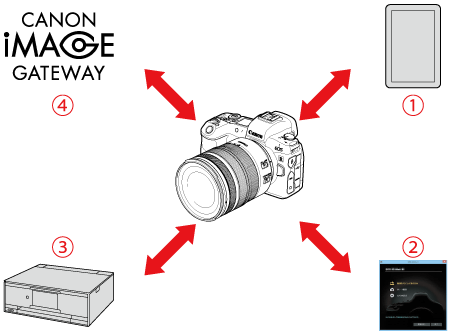
 | Communicate with a smartphone | Control the camera remotely and browse images on the camera over a Wi-Fi connection by using the dedicated Camera Connect app on smartphones or tablets. |
 | Use with EOS software or other dedicated software | Connect the camera to a computer via Wi-Fi and operate the camera remotely using EOS Utility (EOS software). With the dedicated application Image Transfer Utility 2, images on the camera can also be sent to a computer automatically. |
 | Print images using a Wi-Fi printer | Connect the camera to a printer supporting PictBridge (Wireless LAN) via Wi-Fi to print images. |
 | Send images to a Web service | Share images with friends or family on social media or the CANON iMAGE GATEWAY online photo service for Canon customers after you complete member registration (free of charge). |