






Charging the Battery and POWER Lamp Status (EOS 80D)
Solution
The procedure for charging the battery supplied with the camera is described below.
When charging the battery, also refer to Precautions for Charging Battery Pack.
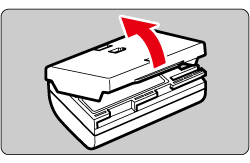
1. Remove the protective cover.
To prevent short circuiting of the electrical contacts, be sure to attach the cover to the battery when you remove the battery from the camera.
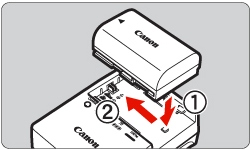
2. Attach the battery securely to the battery charger.
- To detach the battery, follow the above procedure in reverse.
3. Recharge the battery.
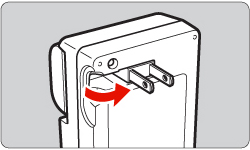
[For LC-E6]
As shown by the arrow, flip out the battery charger's prongs and insert the prongs into a power outlet.
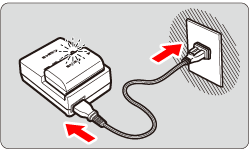
[For LC-E6E]
Connect the power cord to the charger and insert the plug into the power outlet.
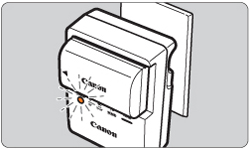
- Recharging starts automatically and the charge lamp blinks in orange.
| Charge Level | Charge Lamp | |
| Color | Display | |
| 0 - 49% | Orange | Blinks once per second |
| 50 - 74% | Blinks twice per second | |
| 75% or higher | Blinks three times per second | |
| Fully charged | Green | Lights up |
NOTE
- It takes approx. 2 hr. and 30 min. to fully recharge a completely exhausted battery at room temperature (23°C/73°F). The time required to recharge the battery will vary greatly depending on the ambient temperature and the battery's remaining capacity.
- For safety reasons, recharging at low temperature (5°C - 10°C/41°F - 50°F) will take longer (up to approx. 4 hr.).
CAUTION
Use of genuine Canon accessories is recommended.
This product is designed to achieve excellent performance when used with genuine Canon accessories.
Canon shall not be liable for any damage to this product and/or accidents such as fire, etc., caused by the malfunction of non-genuine Canon accessories (e.g., a leakage and/or explosion of a battery pack). Please note that this warranty does not apply to repairs arising out of the malfunction of non-genuine Canon accessories, although you may request such repairs on a chargeable basis.