






How do I change the metering mode? (EOS 5DS / EOS 5DS R)
Solution
You can select one of four methods to measure the subject brightness.
In the [  ] mode, evaluative metering is set automatically.
] mode, evaluative metering is set automatically.| Type | Description | ||
|---|---|---|---|
 | Evaluative metering | 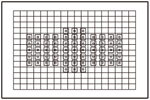 | This is a general-purpose metering mode suited even for backlit subjects. The camera sets the exposure automatically to suit the scene. |
 | Partial metering |  | Effective when the background is much brighter than the subject due to backlighting, etc. Partial metering covers approx. 6.1% of the viewfinder area at the center. |
 | Spot metering |  | This is for metering a specific spot of the subject or scene. The metering is weighted at the center covering approx. 1.3% of the viewfinder area. |
 | Center-weighted average metering |  | The metering is weighted at the center and then averaged for the entire scene. |
To change the metering mode, follow the steps below.
1. Set the power switch to [ON].
2. With the camera ready to shoot, press the [  ] (Metering mode selection/White balance selection) button.
] (Metering mode selection/White balance selection) button.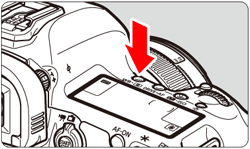
3. While looking at the viewfinder or LCD panel, turn the [  ] dial.
] dial.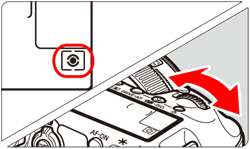
NOTE
- With (Evaluative metering), the exposure setting will be locked when you press the shutter button halfway and focus is achieved (in One-Shot AF mode). In the (Partial metering), (Spot metering), and (Center-weighted average metering) modes, the exposure is set at the moment the picture is taken. (Pressing the shutter button halfway does not lock the exposure.)
- When (Spot metering) is set, you can display [
 ] in the viewfinder
This completes the procedure for changing the metering mode.