









The Built-in Flash Cannot be Fired (EOS 7D Mark II)
Solution
In the <P> <Tv> <Av> <M> <B> modes, you can press the < > button to raise the built-in flash for flash photography.
> button to raise the built-in flash for flash photography.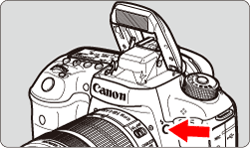
Before shooting, check that [ ] is displayed in the viewfinder. After shooting, push the built-in flash back down you’re your fingers until it clicks into place.
] is displayed in the viewfinder. After shooting, push the built-in flash back down you’re your fingers until it clicks into place.NOTE
In < > mode, the built-in flash will be raised and fire automatically in low-light or backlit conditions. You can also enable or disable the flash firing.
> mode, the built-in flash will be raised and fire automatically in low-light or backlit conditions. You can also enable or disable the flash firing.Please refer to the following table for flash availability by shooting mode.
| Built-in Flash | Shooting Mode | |||||
|---|---|---|---|---|---|---|
|
P | Tv | Av | M | B | |
| Automatic firing |  |
|||||
| Flash on (Fires at all times) after manual pop-up | |
|
|
|
|
|