









Reverting the Camera to the Default Settings (EOS 7D Mark II)
Solution
The camera’s shooting function settings and menu settings can be reverted to their defaults.
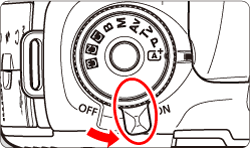
1. Set the power switch to <ON>.
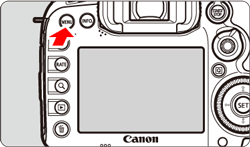
2. Press the <MENU> button to display the menu screen.
3. Press the < > button and select the [
  ] tab.
> button and select the [ ] tab.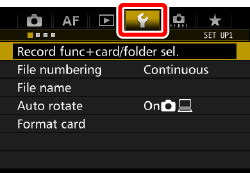

4. Turn the < > dial and select the [
  ] tab.
> dial and select the [ ] tab.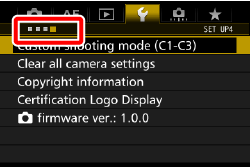

5. Turn the < > dial to select [Clear all camera settings], then press <
 >.
>.
> dial to select [Clear all camera settings], then press <>.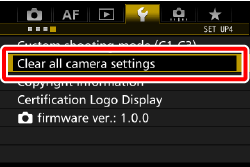
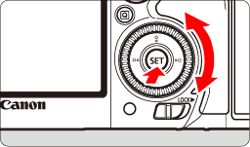
6. Turn the <> dial to select [OK], then press < >.
> dial to select [OK], then press < >.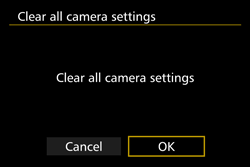
Setting [Clear all camera settings] will reset the camera to the following default settings:
| Shooting Function Settings | |||
| AF operation | One-Shot AF | HDR Mode | Disable HDR |
| AF area selection mode | Single-point AF (Manual Selection) | Interval timer | Disable |
| AF point selection | Center | Bulb timer | Disable |
| Registered AF point | Canceled | Anti-flicker shooting | Disable |
| Metering mode |  (Evaluative metering) (Evaluative metering) | Mirror lockup | Disable |
| ISO speed | Auto | Viewfinder display | |
| ISO speed range | Minimum limit: 100 | Viewfinder level | Hide |
| Maximum limit: 16000 | |||
| Auto ISO range | Minimum limit: 100 | VF grid display  | Disable |
| Maximum limit: 6400 | |||
| Minimum shutter speed | Auto | Show/hide in viewfinder | Only Flicker checkmarked |
| Drive mode |  (Single shooting) (Single shooting) | Custom Functions | Unchanged |
| Exposure compensation/AEB | Canceled | Flash control | |
| Flash exposure compensation | Canceled | Flash firing | Enable |
| Red-eye reduction | Disable | E-TTL II Flash metering | Evaluative flash metering |
| Multiple exposure | Disable | Flash sync. Speed in Av mode | Auto |
| AF | |||
| Case1-6 | Case1/Parameter settings of all cases cleared | Orientation linkedAF point | Same for both vertical/horizontal |
| AI Servo 1st image priority | Equal priority | Initial AF point,  AI Servo AF AI Servo AF | Auto |
| AI Servo 2nd image priority | Equal priority | Automatic AF point selection: EOS iTR AF | Enable |
| Lens electronic MF | Enable after One-Shot AF | Manual AF point selection pattern | Stops at AF area edges |
| AF-assist beam firing | Enable | AF point display during focus | Selected (constant) |
| One-Shot AF release priority | Focus priority | VF display illumination | Auto |
| Lens drive when AF impossible | Continue focus search | AF point during AI Servo AF | Non illuminated |
| Selectable AF point | 65 points | AF status in viewfinder | Show in field of view |
| Select AF area selection mode | All items selected | AF Microadjustment | Disable/Adjustment amount retained |
| AF area selection method | M-Fn button | ||
| Image Recording Settings | |||
| Image quality |  | Color space | sRGB |
| Picture Style | Standard | Long exposure noise reduction | Disable |
| Auto Lighting Optimizer | Standard | High ISO speed noise reduction | Standard |
| Peripheral illumination correction | Enable/Correction data retained | Highlight tone priority | Disable |
| Chromatic aberration correction | Enable/Correction data retained | Record function | Standard |
| Distortion correction | Disable/Correction data retained | File numbering | Continuous |
| White balance |  (Auto) (Auto) | File name | Preset code |
| Custom White Balance | Canceled | Auto cleaning | Enable |
| White balance shift | Canceled | Dust Delete Data | Erased |
| White balance bracketing | Canceled | ||
| Camera Settings | |||
| Auto power off | 1 min. | LCD brightness | Auto |
| Beep | Enable | Date/Time/Zone | Unchanged |
| Release shutter without card | Enable | Eye-Fi settings | Disable |
| Image review time | 2 sec. | Language | Unchanged |
| Highlight alert | Disable | GPS and digital compass settings | Disable |
| AF point display | Disable | Video system | Unchanged |
| Playback grid | Off |  button display options button display options | All items selected |
| Histogram display | Brightness |  button function button function | Rating |
| Movie playback count | Unchanged | Custom shooting mode | Unchanged |
| Magnification (Approx.) | 2x (magnify from center) | Copyright information | Unchanged |
| Control over HDMI | Disable | Configure: MY MENU* | Unchanged |
| Image jump w/ |  (10 images) (10 images) | Menu display | Normal display |
| Auto rotate | On 
 | ||
| Live View Shooting Settings | |||
| Live View shooting | Enable | Aspect ratio | 3:2 |
| AF method |  +Tracking +Tracking | Exposure simulation | Enable |
| Continuous AF | Disable | Silent LV shooting | Mode 1 |
| Grid display | Off | Metering timer | 8 sec. |
| Movie Shooting Settings | |||
| Movie Servo AF | Enable | Time code | |
| AF method | +Tracking | Count up | Unchanged |
| Grid display | Off | Start time setting | Unchanged |
| Movie recording quality | Movie recording count | Unchanged | |
| MOV / MP4 | MOV | Movie playback count | Unchanged |
| Movie recording size | NTSC: 

 | HDMI | Unchanged |
PAL:

| |||
| 24.00P | Disable | Drop frame | Unchanged |
| Sound recording | Auto | Silent control | Disable  |
| Wind filter | Disable |  button function button function |  / / |
| Attenuator | Disable | HDMI output + LCD | No mirroring |
| Movie Servo AF speed | HDMI frame rate | Auto | |
| When active | Always on | ||
| AF speed | Standard | ||
| Movie Servo AF tracking sensitivity | 0 (Standard) | ||
| Silent LV shooting | Mode 1 | ||
| Metering timer | 8 sec. | ||