









A lamp lights even though the flash is set to [Off]
Solution
Even if the flash is set to [Off], a lamp may be activated when you press the shutter button halfway in low-light conditions. This lamp, called the AF-Assist Beam, only lights up to help you focus, and the flash will not fire during shooting.
It is possible to deactivate the AF-Assist Beam in some shooting modes.
*The [AF-Assist Beam] cannot be set to [Off] in some shooting modes. For a list of shooting modes in which setting the [AF-Assist Beam] to [Off] is possible, please refer to the table at the end of the page.The procedure for deactivating the AF-Assist Beam is explained below.
1. Press the <Power> button to turn the camera on.
2. Press the <MENU> button, and then choose the [Shooting] ( ) tab.
) tab.3. Press the <  ><
>< > buttons to choose the [AF-Assist Beam], and then press the <
  ><
>< > buttons to choose [Off].
><> buttons to choose the [AF-Assist Beam], and then press the < ><> buttons to choose [Off].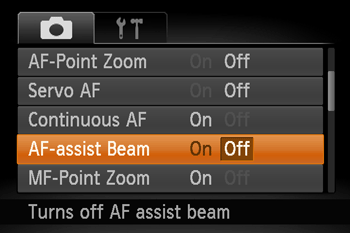
The [AF-Assist Beam] can be set to [Off] in the shooting modes shown in the table below.
| Model | Shooting modes in which setting the [AF-Assist Beam] to [Off] is possible |
|---|---|
| PowerShot SX520 HS |  , , , , , , , , , , , , , , , , , , , , , , , , , , , , , , , , , , , , , , , , , , |
| PowerShot SX60 HS |  *, *, *,,,,,,,, *,,,,,,,, ,,,, ,,,, ,,, ,,, ,,,, ,,,, ,,,,, ,,,,, , , , , |
| PowerShot G7 X |  *,,,,,,,,,,, *,,,,,,,,,,, , , , , , , , , ,,,, ,,,, ,,,, ,,,, ,,,,,,, ,,,,,,, |