









Onscreen Icons and Displays (LEGRIA mini)
Solution
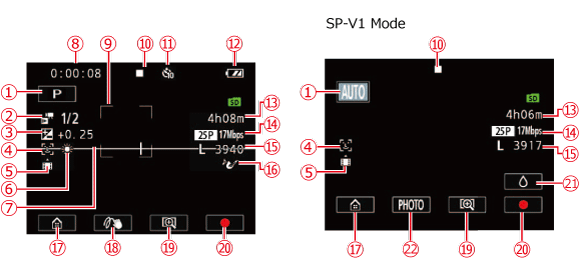
 | Shooting mode button |  *3 *3 | Remaining battery charge |
 *1 *1 | Special recording modes |  *4 *4 | Remaining video recording time |
 | Exposure compensation |  | Frame rate / Video quality |
 | Face detection |  *5 *5 | Photo size / Remaining available number of photos |
 | Orientation detection |  | Audio scene |
 | White balance |  | Home button: Open the Home menu. |
 | Level marker |  | Decoration button |
 | Scene counter (hours: minutes : seconds, only while recording) |  | Change the field of view |
 | Face detection frame |  | Start (  ) / Stop ( ) / Stop (  ) button ) button |
 *2 *2 | Memory card operation |  | Cancel the splashproof case mode |
 | Self timer and countdown |  | PHOTO button: Record a photo. |
Special recording modesInterval recording and selected interval: [
 ] / Slow motion and selected speed: [
  ] / Fast motion and selected speed: [
  ] / Video snapshot and selected video snapshot length: [
  ].
].
*2
Recording status:
Recording: [
 ] / Stopped (not recording): [
  ]
]
*3
Remaining battery charge
The icon shows a rough estimate of the remaining charge of the battery pack. [
 ] is displayed in red when the battery charge becomes low. Replace or charge the battery pack. Depending on the condition of the camcorder or battery, the actual battery charge may not match what is displayed on the screen.
*4
Remaining video recording timeWhen there is no more free space on the memory card, [
 ] will be displayed (in red) on the screen and the recording will stop.
*5
Remaining available number of photosEven if the remaining number of photos that can be recorded is larger, the maximum number displayed on this screen is [9999].
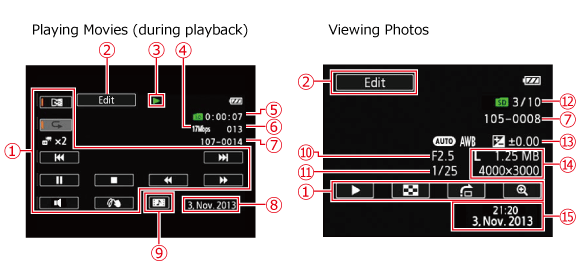
| Playback control buttons | | Capture a video snapshot scene |
| [Edit] button: Open the [Edit] panel | | Aperture value |
| *1 | Memory card operation | | Shutter speed |
| Video quality | | Current photo / Total number of photos |
| Scene playback time | | Exposure compensation |
| Scene number | | Photo size / File size |
| File number | | Recording date and time |
| Recording date |
: : Playback,
  : Playback pause,
  : Fast playback,
  : Fast reverse playback,
  : Slow reverse playback / Slow playback,
  : Frame reverse / Frame advance