









Setting ISO speed (PowerShot G16 / G1 X Mark II)
Solution
Raise the [ISO speed] to use a fast shutter speed when you wish to reduce the effects of camera shake or avoid blurry subjects, or to turn the flash off when shooting in a dark area.
Also, with [ISO AUTO] ( ) selected, you can set the maximum ISO speed, or select the rate of change.
) selected, you can set the maximum ISO speed, or select the rate of change.NOTE
- In this example, the procedure is shown on a [PowerShot G16]. The position and shape of the operation buttons, screens displayed, and setting items may differ according to the model you use.
IMPORTANT
- The following explanations are provided based on the assumption that the [Shooting Mode] is set to [Program AE] (
 ).
). - To set the [ISO Speed], it is necessary to set the [Shooting Mode] to one of the following modes.
- [Custom 1, 2] ( ,
,  ), [Manual] (
 ), [Aperture Priority AE] (
 ), [Shutter Speed Priority AE] (
 ), [Program AE] ().
, ), [Manual] (), [Aperture Priority AE] (), [Shutter Speed Priority AE] (), [Program AE] ().1. Press the <Power> button to turn the camera on.
2. Press the <ISO> < > button located on the camera's back panel.
> button located on the camera's back panel.3. The following screen appears.
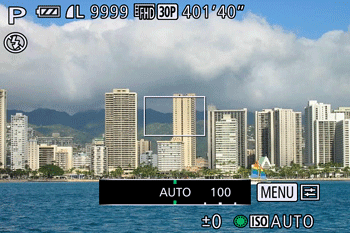
Turn the <Control Dial> < > to choose the ISO speed, and then press the <
 > button.
> to choose the ISO speed, and then press the <> button.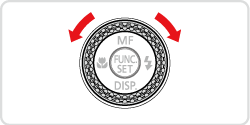
4. If the following icon is shown, the setting is complete
(When the [ISO Speed] is set to 400).
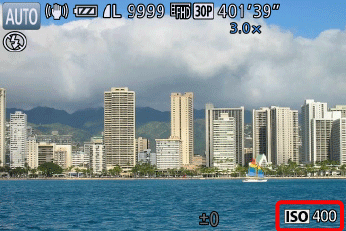
- Set the ISO speed to suit the shooting mode and conditions.
If the camera shake warning icon ( ) appears when you press the <Shutter Button> halfway, it is recommended to gradually raise the ISO speed in increments such as [ISO 80], [ISO 100], etc., and then set the [ISO Speed] when the camera shake warning icon () disappears.
) appears when you press the <Shutter Button> halfway, it is recommended to gradually raise the ISO speed in increments such as [ISO 80], [ISO 100], etc., and then set the [ISO Speed] when the camera shake warning icon () disappears.| Guidelines for changing the ISO speed | ||
|---|---|---|
| AUTO | Automatically adjusts the ISO speed to suit the shooting mode and conditions. | |
| 80, 100, 125, 160, 200 | Low High | For shooting outdoors in fair weather. |
| 250, 320, 400, 500, 640, 800 | For shooting in cloudy conditions, or at twilight. | |
| 1000, 1250, 1600, 2000, 2500, 3200, 4000, 5000, 6400, 8000, 10000, 12800 | For shooting night scenes, or in dark rooms. | |
NOTE
- To view the automatically determined ISO speed when you have set the ISO speed to [AUTO], press the shutter button halfway.
- Although choosing a lower ISO speed may reduce image graininess, there may be a greater risk of subject blurriness in some shooting conditions.
- Choosing a higher ISO speed will increase shutter speed, which may reduce subject blurriness and increase the flash range. However, shots may look grainy.
IMPORTANT
- The following explanations are provided based on the assumption that the [ISO Auto Settings] is set to [Program AE] ()
- To set the [ISO Speed], it is necessary to set the [Shooting Mode] to one of the following modes.
- [Custom 1, 2] (, ), [Aperture Priority AE] (), [Shutter Speed Priority AE] ()*, [Program AE], ( )
, ), [Aperture Priority AE] (), [Shutter Speed Priority AE] ()*, [Program AE], ( )* For the [Shutter Speed Priority] (), only [Max ISO Speed] is available.
), only [Max ISO Speed] is available.- Follow the steps below to set the maximum ISO speed with [ISO AUTO] () selected.
1. Press the <MENU> ( ) button.
) button.2. The following screen appears.
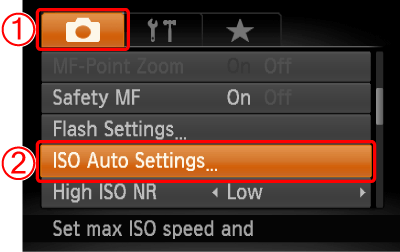
 Press the <
 ><
>< > buttons to choose the [Shooting] (
 ) tab.
 Press the <
 ><
>< > buttons to choose [ISO Auto Settings].
Press the <FUNC./SET> () button.
) button.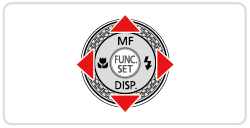
3. The following screen appears.
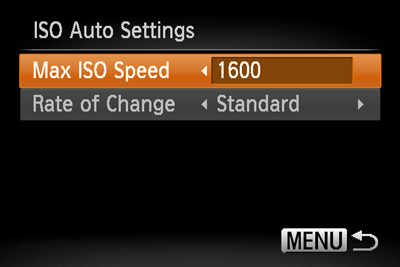
Select [Max ISO Speed], and press the <><> buttons to select one of the speed settings.
><> buttons to select one of the speed settings. NOTE
You can set the [Max ISO Speed] to the speed settings between [ISO400] and [ISO12800].
- Follow the steps below to set the rate of change with [ISO AUTO] () selected.
Choose [Rate of Change] under [ISO Auto Settings].
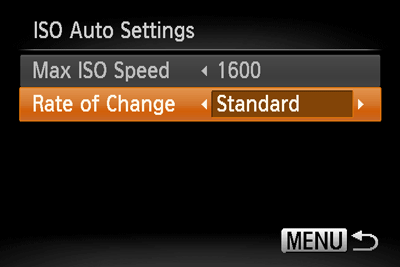
Press the <><> buttons to choose the desired item.
><> buttons to choose the desired item.NOTE
You can select one of the three types, [Fast], [Slow], and [Standard] for the [Rate of Change].
After you set the [Rate of Change], press the <MENU> () button.
) button.NOTE
You can also access the [ISO Auto Settings] screen when the ISO speed setting screen is displayed, by pressing the ( ) button.
) button.