









Shooting in Various Scenes (PowerShot SX510 HS)
Solution
Choose a mode matching the shooting scene, and the camera will
automatically configure the settings for optimal shots.
1. Turn on the camera.
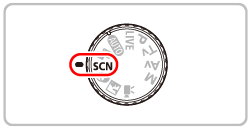
2. Set the <Mode Dial> to <Special Scene Mode> ( ).
).
).
REFERENCE
- If you want to add effects to images when shooting, set the <Mode Dial> to <Creative Filters Mode> (
 ). Subsequent procedures are the same as described below.
3. Press the <FUNC./SET> ( ).
).
).4. Operate the <directional buttons> up or down to select [Shooting Mode]*, and then press the <FUNC./SET> () button.
) button.* If no changes have been made to the settings so far, [Portrait] ( ) will be displayed.
) will be displayed.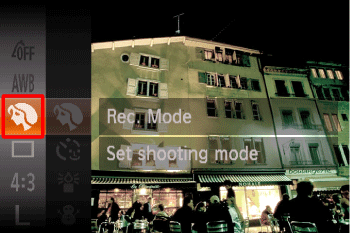
Operate the <directional buttons> up or down to select the desired [Shooting mode]. (The [Low Light] ( ) mode has been selected in the below image.)
) mode has been selected in the below image.)After you have selected a shooting mode, press the <FUNC./SET> () button.
) button.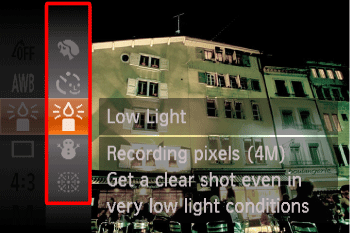
5. The following screen appears.
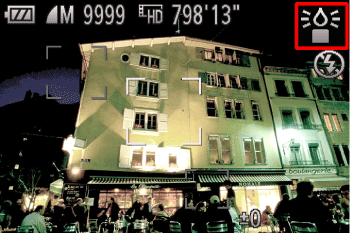
When the icon for the [Shooting Mode] you selected appears in the top-right corner of the screen, the setting is complete.
| Mode | Scene | Shooting mode | Effect | |
|---|---|---|---|---|
| Shoot portraits | [Portrait] () | Take shots of people with a softening effect. | |
| Shoot under low light | [Low Light] () | Shoot with minimal camera shake and subject blur even in low-light conditions. | ||
| Shoot with snowy backgrounds | [Snow] ( ) ) | Bright, natural-colored shots of people against snowy backgrounds. | ||
| Shoot fireworks | [Fireworks] ( ) ) | Vivid shots of fireworks. | ||
| Shooting with a Fish-Eye Lens Effect | [Fish-eye Effect] (  ) ) | Shoot with the distorting effect of a fish-eye lens. | |
| Shots Resembling Miniature Models | [Miniature Effect] ( ) ) | Creates the effect of a miniature model, by blurring image areas above and below your selected area. | ||
| Shooting with a Toy Camera Effect | [Toy Camera Effect] ( ) ) | This effect makes images resemble shots from a toy camera by vignetting(darker, blurred image corners) and changing the overall color. | ||
| Shooting in Monochrome | [Monochrome] ( ) ) | Shoot images in black and white, sepia, or blue and white. | ||
| Shoot in vivid colors | [Super Vivid] ( ) ) | Shots in rich, vivid colors. | ||
| Posterized shots |  ) ) | Shots that resemble an old poster or illustration. | ||
NOTE
- In [Fireworks] () mode, mount the camera on a tripod or take other measures to keep it still and prevent camera shake. Additionally, you should set [IS Mode] to [Off] when using a tripod or other means to secure the camera
- [Low Light] () mode resolution is (
 ) (1984 x 1488) and cannot be changed.
 - In [Miniature Effect] () mode, holding the camera vertically will change the orientation of the frame.
- In [Miniature Effect] () mode, Movie image quality is [
 ] at an aspect ratio of [
  ] and [
  ] at an aspect ratio of [
  ] . These quality settings cannot be changed.
 - In the [Super Vivid] (), [Poster Effect] (), [Fish-eye Effect] (), [Miniature Effect] (), [Toy Camera Effect] ( ) modes, try taking some test shots first, to make sure you obtain the desired results.