









Selecting an audio scene to match your surroundings
Solution
You can have the camcorder optimize the audio settings of the built-in microphone by selecting the audio scene that matches your surroundings. This will greatly enhance the sense of "being there".
Alternatively, you can select [Custom Setting] in order to adjust the camcorder's various audio settings to your liking.
The procedure for setting audio scenes is explained below.
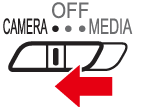
1. Set the power switch to <CAMERA>.
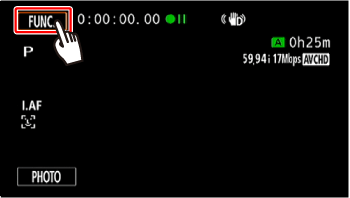
2. Touch [  ].
].
].
3.  Drag your finger up or down to choose
  [Audio Scene].
Drag your finger up or down to choose [Audio Scene].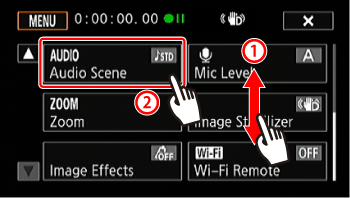
4. Touch the desired option and then touch [X].
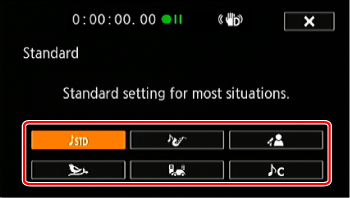
Options ( Default value)
Default value) Standard Standard | To record most general situations. The camcorder records with standard settings. |
 Music Music | To vibrantly record music performances and singing indoors. |
 Speech Speech | Best for recording human voices and dialog. |
 Forest and Birds Forest and Birds | To record birds and scenes in forests. The camcorder clearly captures sound as it spreads. |
 Noise Suppression] Noise Suppression] | To record scenes while reducing noise from wind, passing vehicles and similar ambient sound. Ideal for recording at the beach or in places with a lot of noise. |
 Custom Setting* Custom Setting* | Allows you to adjust the audio settings to your liking. |
] panel and the following settings in the [  ]: [Built-in Mic Wind Screen], [Built-in Mic Att.], [Built-in Mic Freq. Response] (audio equalizer), and [Built-in Mic Directionality].
[Custom Setting] is not available in
]: [Built-in Mic Wind Screen], [Built-in Mic Att.], [Built-in Mic Freq. Response] (audio equalizer), and [Built-in Mic Directionality].
[Custom Setting] is not available in Settings for each audio scene
| Standard | Music | Speech | Forest and Birds | Noise Suppression | Custom Setting | |
|---|---|---|---|---|---|---|
| Mic Level | Manual 70 | Manual 70 | Manual 86 | Manual 80 | Manual 70 | Automatic / Manual |
| Built-in Mic Wind Screen | Auto (High) | Auto (Low) | Auto (High) | Auto (High) | Auto (High) | Auto (High)/ Auto (Low)/ OFF |
| Built-in Mic Att. | Automatic | Automatic | Automatic | Automatic | Automatic | Automatic/ ON/ OFF |
| Built-in Mic Directionality | Normal | Wide | Monaural | Wide | Monaural | Monaural/ Normal / Wide / Zoom |
| Built-in Mic Freq. Response | Normal | Boost HF+LF Range | Boost MF Range | Low Cut Filter | Low Cut Filter | Normal/ Boost LF range/ Low Cut Filter / Boost MF Range / Boost HF+LF Range |
This concludes the procedure for setting audio scenes.