









The Built-in Flash Cannot be Fired (EOS 70D)
Solution
When you want to use the flash for shooting, press the < > button to manually pop-up the flash.
> button to manually pop-up the flash.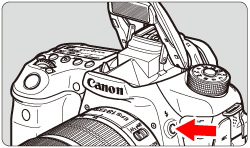
Please refer to the following table for flash availability by shooting mode.
| Built-in Flash | Basic Zone | Creative Zone | |||||||||||||||
 |  |  |  | ||||||||||||||
 |  |  |  |  |  |  |  |  |  |  |  |  | |||||
| Automatic firing |  | ||||||||||||||||
| Automatic firing, Flash on (Fires at all times), Flash off possible | | | | | |||||||||||||
| Flash on (Fires at all times), Flash off possible | | ||||||||||||||||
| Flash on (Fires at all times) after manual pop-up | | | | | | ||||||||||||
| Flash off | | | | | | ||||||||||||
NOTE
・Icons used on this page:
: Scene Intelligent Auto / : Flash Off /  : Creative Auto / : Special scene / : Portrait mode / : Landscape / : Close-up /
  : Sports / : Night Portrait / : Handheld Night Scene /
  : HDR Backlight Control / : Program AE / : Shutter-priority AE / : Aperture-priority AE / : Manual exposure / : Bulb / : Still Photo Shooting during Movie Shooting