









I want to select an AF frame before shooting (EOS 70D)
Solution
NOTE
Icons used on this page:
< >: AF point selection button / <
 >: AF area selection button / <
 >: Multi-controller / <
 >: Main Dial / <
 >: Quick Control Dial
>: AF point selection button / <>: AF area selection button / <>: Multi-controller / <>: Main Dial / <>: Quick Control DialYou can manually select the AF point or zone. If 19-point automatic selection AF + AI Servo AF has been set, you can select any position where AI Servo AF is to start.
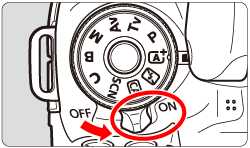
1. Set the camera’s power switch to <ON>.
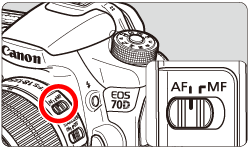
2. Set the lens focus mode switch to <AF>.
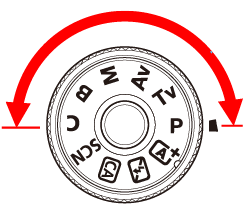
3. Turn the Mode Dial to a Creative Zone mode.
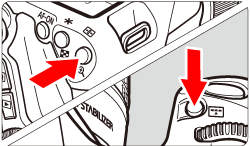
4. Press the <> or the <> button.
> or the <> button.The selected AF point will be displayed in the viewfinder and on the LCD panel.
- In the Zone AF mode, the selected zone will be displayed.
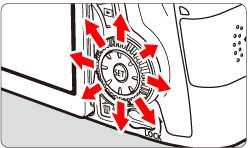
5. Select an AF point.
- The AF point selection will change in the direction you tilt <
 >. If you press <
 >, the center AF point (or center zone) will be selected.
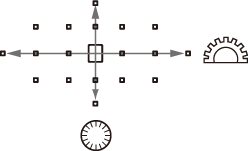
 - You can also select a horizontal AF point by turning the <> dial and select a vertical AF point by turning the <> dial.
- In the Zone AF mode, turning the <> or <> dial will change the zone in a looping sequence.
NOTE
- When you hold down the <
 > button and turn the <> dial, you can select a vertical AF point.
 - When you press the <> or <> button, the LCD panel displays the following:
・19-point automatic selection AF and Zone AF (manual zone selection): 
・1 pt AF (Manual selection):  (Center)/
  (Off center)
(Center)/ (Off center)・With  C.Fn II-10: Manual AF pt. selec. pattern], you can set either [Stops at AF area edges] or [Continuous]. For more information, please refer to [C.Fn II -10 Manual AF point selection pattern] in the camera`s instruction manual.
C.Fn II-10: Manual AF pt. selec. pattern], you can set either [Stops at AF area edges] or [Continuous]. For more information, please refer to [C.Fn II -10 Manual AF point selection pattern] in the camera`s instruction manual.