









Shooting Subjects Up Close (PowerShot A2500)
Solution
If you are shooting a subject at a close distance, and if the subject cannot be easily focused within the normal shooting range, switching from the normal mode to the [Macro] ( ) mode will make it easier to focus on the subject.
) mode will make it easier to focus on the subject.IMPORTANT
- The following explanations are provided based on the assumption that the [Shooting Mode] is set to [Program] (
 ).
). - The edges of the image may darken if the flash fires.
1. Press the <Power> button on the camera.
2. Press the <FUNC./SET> ( ) button.
) button.3. Press the < ><
>< > buttons to choose [Focusing Range] (
 ), and then press the <FUNC./SET> () button or the <
 > button.
><> buttons to choose [Focusing Range] (), and then press the <FUNC./SET> () button or the <> button.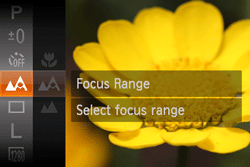
4. Press the <> <> buttons to choose [Macro] ().
> <> buttons to choose [Macro] ().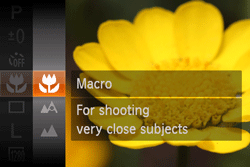
Once the setting is complete, [Macro] () is indicated on the LCD Monitor.
) is indicated on the LCD Monitor.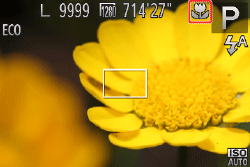
REFERENCE
- Try attaching the camera to a tripod and shooting in [Self-Timer] to prevent the camera from moving and blurring the image.
NOTE
- The screen indications when operating the <Zoom lever> in [Macro] () mode are as follows.
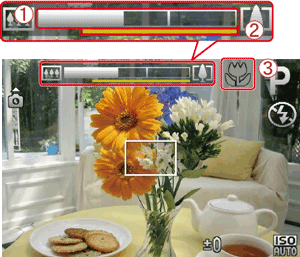
When you move the <Zoom lever>,  the [Zoom bar] appears on the screen.
the [Zoom bar] appears on the screen.The camera cannot focus in the  yellow portion of the bar (When zooming within the range of the yellow bar,
  (
( ) will be grayed out and shooting will be done in ().
yellow portion of the bar (When zooming within the range of the yellow bar, () will be grayed out and shooting will be done in ().The shooting distance for each [Focusing Range] is as shown in the following table (from the end of the lens). If you shoot beyond the following ranges, the subject may be out of focus.
Also, the [Focusing Range] cannot be set in some shooting modes. Please see the following table for details.
 ... Focusing Range cannot be set
| Model | Shooting distance | Shooting modes in which [Focusing Range] cannot be set | |||
| [Normal] | [Macro] |  |  |  | |
| PowerShot A2500 | 5 cm (2.0 in.) - infinity (W)* 1.2 m (3.9 ft.) - infinity (T)** | 3 - 50 cm (W) (1.2 in. – 1.6 ft. (W)) | | | |
 ) to the maximum wide angle side (Max. wide angle).
** (T): When turning the zoom lever toward (
 ) to the maximum telephoto side (Max. telephoto).