









Languages that can be displayed on the LCD monitor and methods for changing the language (PowerShot N)
Solution
You can change the language that is displayed on the screen.
For details about the languages that can be displayed, see the screen shown in step 3.
1. Press the <Playback> ( ) button to turn on the camera.
) button to turn on the camera.2. Touch [FUNC.] ( ), and then touch and hold [MENU] (
 ).
).
), and then touch and hold [MENU] ().3. The following screen will appear on the LCD monitor.
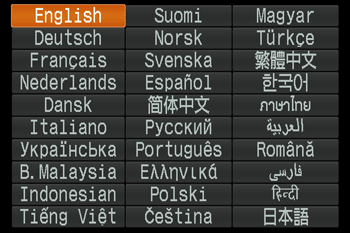
Select a target language, and then touch [  ].
].
].The selected language will be displayed and the setting screen will disappear.