Check to see if the camera is horizontal (level) (PowerShot G15)
Solution
An electronic level can be displayed as a guideline to ensure the camera is level from front to back and left to right.
IMPORTANT
- The position and shape of the operation buttons, screens displayed, and setting items may differ according to the model you use.
- The following explanations are provided based on the assumption that the [Shooting Mode] is set to [Program] (
 ).
). - If the [Shooting Mode] is set to [Quick] (
 ), the [Electronic Level] cannot be displayed.
1. Press the < > button a few times to display the [Electronic Level].
> button a few times to display the [Electronic Level].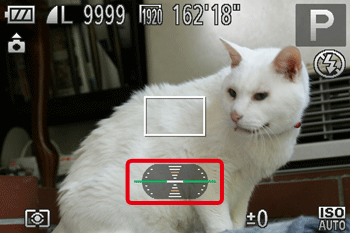
2. Level the camera.
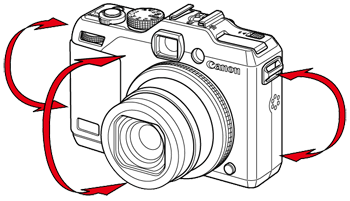
If the camera is tilted, move it so that the red line changes to green.
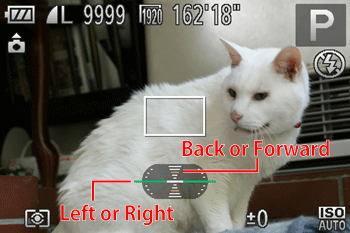
NOTE
- If the [Electronic Level] does not appear in Step 1, press the <
 > button to display the [Shooting] tab (
 ). In the [Custom Display] options, add a check (
 ) to either (
 ) or (
 ).
). - The [Electronic Level] will not appear while shooting a movie.
- Holding the camera vertically will change the orientation of the [Electronic Level].
If the subject does not appear level even when the camera's tilt has been adjusted so that the center of the [Electronic Level] is green, calibrate the [Electronic Level].
If you use the [Grid Lines] to confirm that the camera is level beforehand, you can calibrate the electronic level more accurately.
NOTE
- To display the [Grid Lines], press the <> button a few times, and the [Grid Lines] will appear.
- If the [Grid Lines] do not appear, press the <
 > button to display the [Shooting] tab (). In the [Custom Display] options, add a check () to either () or ().
3. Press the <> button.
> button.4. The following window appears.
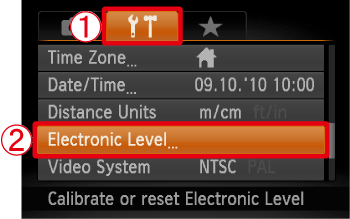
Operate the <directional buttons> left or right to select  the [Set up] (
 ) tab.
the [Set up] () tab.Operate the <directional buttons> up or down to select  [Electronic Level].
[Electronic Level].After making a selection, press the <FUNC./SET> ( ) button.
) button.5. The following window appears.
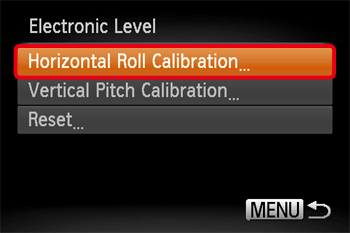
To adjust left/right tilt, choose [Horizontal Roll Calibration], and to adjust forward/backward tilt, choose [Vertical Pitch Calibration], followed by the <> button.
> button.NOTE
- If you want to restore the default settings for the [Electronic Level], select [Reset].
- If the [Electronic Level] has not been calibrated, it cannot be reset.
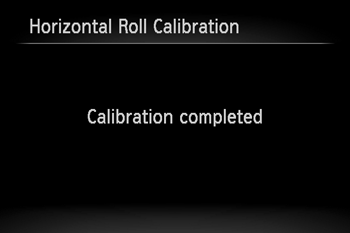
6. The following window appears.
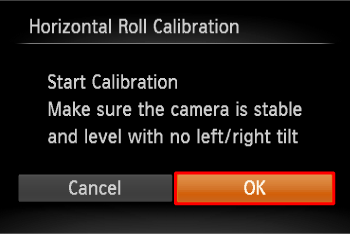
Operate the <directional buttons> left or right to select [OK].
After making a selection, press the <FUNC./SET> () button.
) button.7. The following window appears.