Solution
You can shoot up to approx. 4.3 shots per second.
This is effective for shooting a child running toward you or capturing different facial expressions.
CAUTION
- When the battery level is low, the continuous shooting speed will become slightly slower.
- The continuous shooting speed may become slower depending on the lens type, shutter speed, aperture, subject conditions, brightness, flash use, etc.
- When you use a Creative Filter and shoot, even if you set the drive mode to <
 > (continuous shooting), single shooting will take effect.
1. Set the power to <ON>.
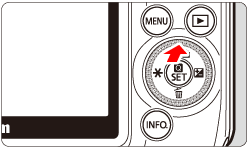
2. Press the <

/
> button.
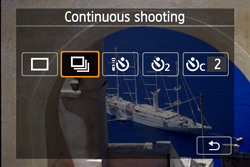
3. Tap [
] ], and then tap [

].
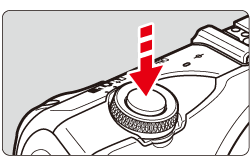
4. The camera shoots continuously while you hold down the shutter button completely.
REFERENCE
Also set the AF operation matching the subject.
・For a subject moving back and forth
When an EF-M lens is being used and [Servo AF] and [AF method] are both set, focusing on a subject moving back and forth (towards or away from the camera) will be continuous during continuous shooting.
When One-Shot AF is set, the camera will focus only once during continuous shooting.
The continuous shooting speed (maximum number of frames per second) depends on the AF operation settings and the lens used.
| AF operation |
|---|
| One-Shot AF | Servo AF |
|---|
| approx. 4.3 fps | EF-M18-55mm f/3.5-5.6 IS STM: approx. 1.7 fps |
| EF-M22mm f/2 STM: approx. 1.2 fps |
| EF and EF-S lenses: approx. 4.3 fps |
* During continuous shooting, the focusing mode for the shots after the first one depends on the lens used. When an EF-M lens is attached, the AF frame selected will be fixed and the camera will keep focusing the subject within the selected AF frame. When an EF or EF-S lens is attached, AF lock will be used.
NOTE
Flash can also be used (with Speedlite 90EX attached). Since the flash will require recycling time, the continuous shooting speed will be slower.