Setting the Flash (Flash On) (PowerShot SX500 IS / SX160 IS)
Solution
When setting [Flash] to [Auto], [Flash] is not activated if the surroundings are light. However, when shooting with the subject backlit, [Flash] is sometimes used not to make the subject dark. This section describes the setting to shoot the shots with constant flash.
IMPORTANT
- The following explanations are provided based on the assumption that the [Shooting Mode] is set to [Program AE] (
 ).
). - In the following shooting modes, you cannot set the [Flash] to the On setting to make it fire every time you shoot.
- [AUTO] ( ),[Low Light] (
 ), [Fireworks] (
 ),[Discreet Mode] (
 ), [Movie] (
 )
)
),[Low Light] (), [Fireworks] (),[Discreet Mode] (), [Movie] ()- The position and shape of the operation buttons, images displayed, and setting items may differ depending on the model you are using.
1. Press the <Power> button on the camera.
2.Lift the flash.(PowerShot SX500 IS)
Raise the flash. Press the <Flash up> button ( ). (PowerShot SX160 IS)
). (PowerShot SX160 IS)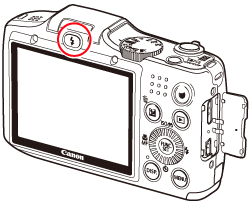
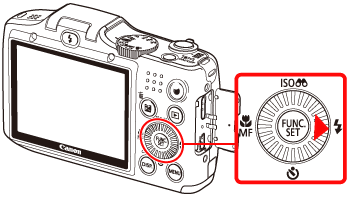
3. Press the <Flash> button ().
). 
4. The following screen will appear in the LCD screen.
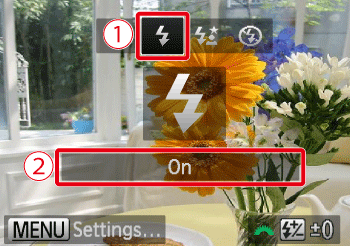
 Operate the <directional buttons> to select the [Flash On] (
 ).
). Make sure to select [On].
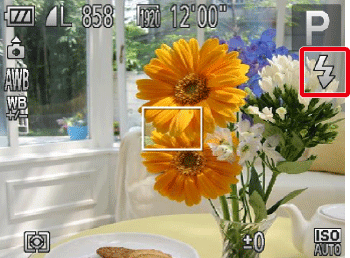
5. If the following icon is displayed on the monitor, this completes the setting process.