









Playing Back Recordings on DLNA Devices
Solution
If you have a DLNA-compatible player, such as an HDTV, on your home network, you can watch your recordings* wirelessly. In such case, the camcorder acts as a digital media server (DMS) and the HDTV acts as a digital media player (DMP). From the HDTV, you can easily search for recordings in the camcorder and play them back.
* Many DLNA players do not support playback of MP4 movies.
NOTE
It is necessary to make the settings for connecting the camcorder to a wireless LAN in advance. Please see the following information about making these settings.
- If your wireless LAN supports WPS:
- If you will make the settings manually:
IMPORTANT
- Do not open the memory card slot cover during the wireless connection.
- Playback may not appear smooth depending on the wireless router's settings and capability. In such case, try the following.
- Remove any objects between the camcorder and wireless access point that may interfere with the wireless signal.
- Move the camcorder closer to the wireless access point.
- Turn off the wireless functions of other wireless devices other than the DLNA-compatible device being used for playback.
- Switch the wireless access point to IEEE 802.11n and activate channel bonding. Refer to its instruction manual for details.
If these do not improve playback, the cause may be due to conditions unique to the surrounding area. Use the supplied HDMI cable to connect the camcorder to the device.

An HDTV or other media player certified as a DLNA Digital Media Player (DMP), correctly configured and connected to the network. We recommend using a LAN cable to connect the HDTV or media player. Look for the DLNA Certified logo on the HDTV and refer to the instruction manual of the HDTV for details on connecting it to the network.
1. Press < > to set the camcorder to playback mode.
> to set the camcorder to playback mode.2. Press <HOME> to set the camcorder.
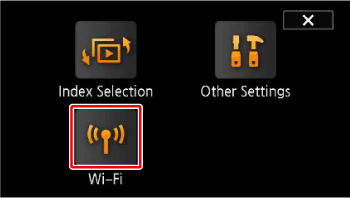
3. Touch [Wi-Fi].
4. Touch [DLNA Media Server].
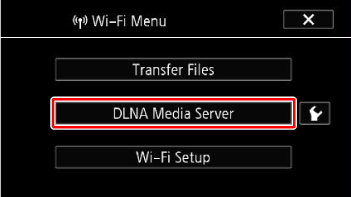
•If the memory card slot cover is open, the option will not be available. Make sure the cover is closed properly.
•If only one connection point has been set up, the wireless connection
will be established. Skip to step 6.
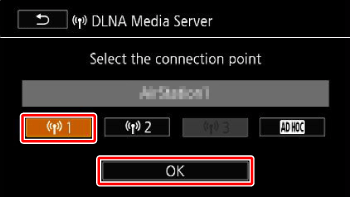
5. Camcorder: Touch the desired connection point and then touch [OK].
6. DLNA Digital Media Player: Select your camcorder model from the list and then play back your recordings.
•The ACCESS indicator blinks during the connection.
•Refer to the DLNA device's instruction manual for details on the procedure.
7. Play back the videos in the folder that appears (built-in memory or memory card).
8. Camcorder: When you have finished playing back, touch [End] to end the Wi-Fi connection.
REFERENCE
- If playback is not smooth
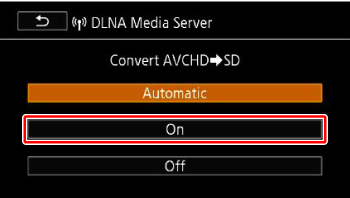
If the video's playback is not smooth, you can play back the video in standard definition.
1. Perform the operations in steps 1 through 3 under [Playback on DLNA Devices].
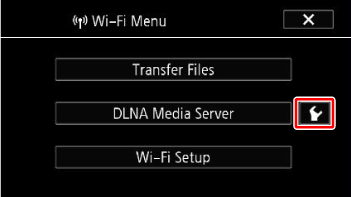
2. On the screen in step 4, touch [  ].
].
].
3. Touch [On] > [  ].
].
]. 
4. Touch [DLNA Media Server], and then select the connection point.
- Touch [Off] when you want to play back your movies in AVCHD.