









How do I set the White Balance? (EOS 5D Mark III)
Solution
The White Balance feature on this camera is set to "Auto White Balance" at the time of purchase. Normally, the [AWB] (Auto) setting will obtain the correct white balance. If natural looking colors cannot be obtained with [AWB], you can set the white balance manually to suit the respective light source.
NOTE
[AWB] is automatically set in the <  > mode.
> mode.To set the White Balance, follow the steps below.
1. Set the power switch to <ON>.
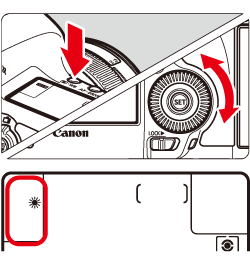
2. When the camera is ready to shoot, press the <WB> button.
While looking at the LCD panel, turn the <Quick Control Dial> to select to the desired style.
| Display | Mode | Color Temperature (Approx. K: Kelvin) |
 | Auto | 3000 - 7000 |
 | Daylight | 5200 |
 | Shade | 7000 |
 | Cloudy, twilight, sunset | 6000 |
 | Tungsten light | 3200 |
 | White fluorescent light | 4000 |
 | Flash use | Automatically set* |
 | Custom | 2000 - 10000 |
 | Color temperature | 2500 - 10000 |
[  ] (Custom White Balance) enables you to manually set the white balance for a specific light source for better accuracy. Do this procedure under the actual light source to be used. For more information on registering custom white balance, please refer to the instruction manual that came with your camera.
] (Custom White Balance) enables you to manually set the white balance for a specific light source for better accuracy. Do this procedure under the actual light source to be used. For more information on registering custom white balance, please refer to the instruction manual that came with your camera.This completes the white balance setting.