









Setting ISO speed (PowerShot S100)
Solution
Raise the [ISO speed] to use a fast shutter speed when you wish to reduce the effects of camera shake or avoid blurry subjects, or to turn the flash off when shooting in a dark area.
Also, with [ISO AUTO] ( ) selected, you can set the maximum ISO speed, or select the rate of change.
) selected, you can set the maximum ISO speed, or select the rate of change.IMPORTANT
- The following explanations are provided based on the assumption that the [Shooting Mode] is set to [Program] (
 ) .
) . - To set the [ISO Speed], it is necessary to set the [Shooting Mode] to one of the following modes.
- [Custom] ( ), [Manual] (
 ), [Aperture Priority] (
 ), [Shutter Speed Priority] (
 ), [Program] (), [Movie Digest] (
 )
)
), [Manual] (), [Aperture Priority] (), [Shutter Speed Priority] (), [Program] (), [Movie Digest] ()1. Press the <Power> button on the camera.
2. Press the <FUNC./SET> ( ) button.
) button.3. The following screen appears on the LCD monitor.
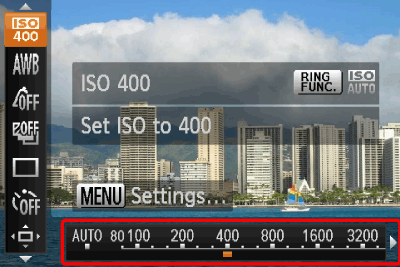
Operate the <Directional buttons> left or right to select an [ISO Speed]* of your choice.
After the selection is made, press the <FUNC./SET> () button.
) button.* Select the appropriate [ISO Speed] for the shooting environment.
If the camera shake warning icon ( ) appears when you press the <Shutter Button> halfway, it is recommended to gradually raise the ISO speed in increments such as [ISO 80], [ISO 100], etc., and then set the [ISO Speed] when the camera shake warning icon () disappears.
) appears when you press the <Shutter Button> halfway, it is recommended to gradually raise the ISO speed in increments such as [ISO 80], [ISO 100], etc., and then set the [ISO Speed] when the camera shake warning icon () disappears.| Guidelines for changing the ISO speed | |
|---|---|
| Automatically adjusts the ISO speed to the Shooting mode and shooting conditions. |
     | Fine weather conditions, outdoor shooting. |
      | Cloudy, twilight |
         | Nightscapes, dark interiors |
4. If the following icon is shown, the setting is complete (if setting [ISO Speed] to 400).
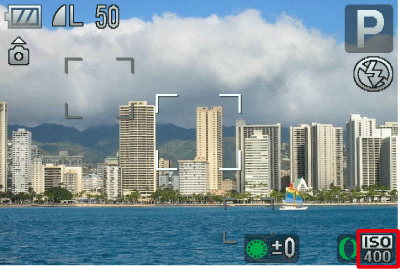
NOTE
- Lowering the [ISO speed] results in sharper images, but there may be an increased chance of image blurring in certain shooting conditions.
- Raising the [ISO speed] results in a faster shutter speed, reducing image blurring and letting the flash reach greater distances to the subject. The images, however, will appear coarse.
IMPORTANT
- The following explanations are provided based on the assumption that the [ISO Auto Settings] is set to [Program] () .
- To set the [ISO Speed], it is necessary to set the [Shooting Mode] to one of the following modes.
- [Custom] (), [Aperture Priority] (), [Shutter Speed Priority] ()*, [Program] (), [Movie Digest] ()
), [Aperture Priority] (), [Shutter Speed Priority] ()*, [Program] (), [Movie Digest] ()* For the [Shutter Speed Priority] (), only [Max ISO Speed] is available.
), only [Max ISO Speed] is available.- Follow the steps below to set the maximum ISO speed with [ISO AUTO] () selected.
1. Press the <MENU> ( ) button.
) button.2. The following screen appears on the LCD monitor.
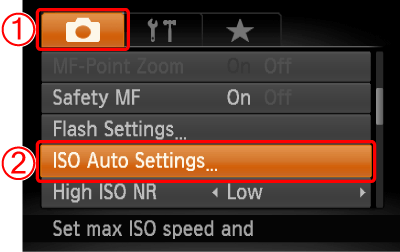
 Operate the <Directional buttons> left or right to select the [Shooting] (
 ) menu.
 the <Directional buttons> up or down to select the [ISO Auto Settings].
Press the <FUNC./SET> () button.
) button.3. The following screen appears on the LCD monitor.
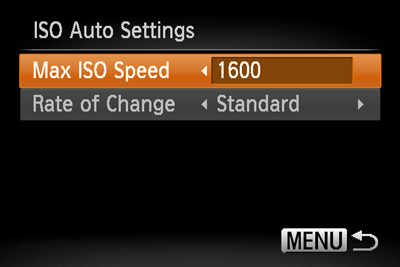
Select [Max ISO Speed], operate the <Directional buttons> left or right to select one of the speed settings.
NOTE
You can set the [Max ISO Speed] to the speed settings between [ISO400] () and [ISO1600] ().
) and [ISO1600] ().- Follow the steps below to set the rate of change with [ISO AUTO] () selected.
Select [Rate of Change] under [ISO Auto Settings].
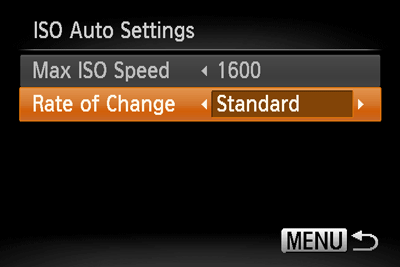
Operate the <Directional buttons> left or right to select one of the items.
NOTE
You can select one of the three types, [Fast], [Slow], and [Standard] for the [Rate of Change].
After you set the [Rate of Change], press the <MENU> () button.
) button.