









Changing the Recording programs according to the situation, such as in dark surroundings
Solution
You can make recordings of bright subjects in dark surroundings by changing the shutter speed or Special Scene recording program, or by using the optional VL-5 Video Light or VFL-2 Video Flash Light.
Also, by using AGC Limit, you can make recordings in dark surroundings at a brightness close to how the scene actually looks.
This section explains how to change shooting modes.
1. Turn on the camcorder.
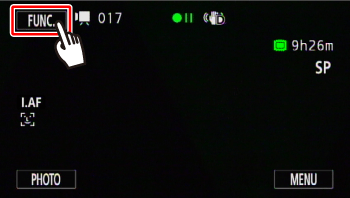
2. Touch [  ].
].
].
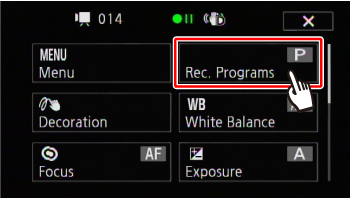
3. Touch [Rec. Programs].
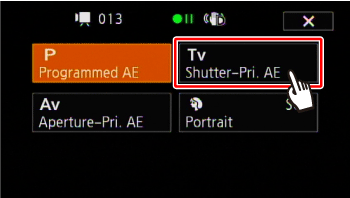
4. Touch [Tv Shutter-Pri. AE] and then set the desired shutter speed.
5. If you are recording in dark surroundings, set the shutter speed to 1/8, 1/15, or 1/30 seconds.
Touch [  ] or [
  ], or drag your finger along the dial.
] or [ ], or drag your finger along the dial.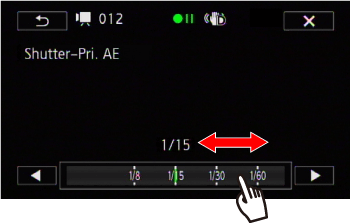
If you set the Recording programs to the Special Scene recording program, such as [Low Light], which allows you to record bright subjects in dark surroundings, or [Night Scene], which allows you to record night scenes with low noise, you can make recordings with low noise, depending on the place or the subject.
1. Touch [  Portrait* ].
Portrait* ].*The current Special Scene recording program setting is displayed.
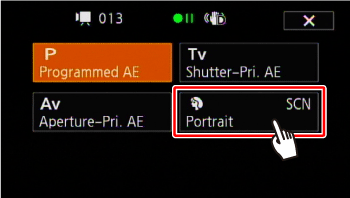
2. Drag your finger up and down to select the desired recording program.
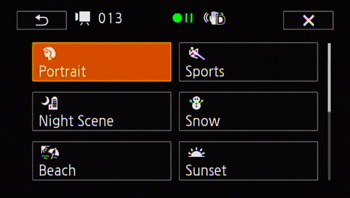
Options
| Special Scene Recording Program | Contents |
 Portrait | The camcorder uses a large aperture, to achieve a sharp focus on the subject while blurring the background. |
 Sports | To record sports scenes such as tennis or golf. |
 Night Scene | To record nightscapes with lower noise. |
 Snow | To record in bright ski resorts without the subject being underexposed. |
 Beach | To record on a sunny beach without the subject being underexposed. |
 Sunset | To record sunsets in vibrant colors. |
 Low Light | To record in low-light situations. |
 Spotlight | To record spotlit scenes. |
 Fireworks | To record fireworks. |
 Underwater | To record underwater scenes in natural colors. |
 Surface | To record after getting out of the water, such as on a boat after diving. |
NOTE
- [ Portrait]/[
 Sports]/[
  Snow]/[
  Beach]: The picture may not appear smooth during playback.
 - [ Portrait]: The blur effect of the background increases the more you zoom in (P).
- [ Snow]/[ Beach]: The subject may become overexposed on cloudy days or in shaded places. Check the image on the screen.
- [
 Low Light]:
- Moving subjects may leave a trailing afterimage.
- Picture quality may not be as good as in other modes.
- White points may appear on the screen.
- Autofocus may not work as well as in other modes. In such case, adjust the focus manually.
- [
 Fireworks]: To avoid camcorder blur (blur due to the camcorder moving) we recommend using a tripod.
 - [
 Underwater]/[
  Surface]:
- This mode is used when recording with the camcorder inside a waterproof case, which is sold separately. For details, please see the Related information.