









How do I resize images captured by EOS REBEL T3i/EOS 600D with the camera? (How to resize an image to make the pixel count lower.)
Solution
With your camera, you can resize an image to make the pixel count lower and save it as a new image. Resizing an image is possible only with JPEG L / M / S1 / S2 images.
IMPORTANT
JPEG S3 and RAW images cannot be resized.
1. Flip out the LCD monitor, then set the power switch to <ON>.
For the details about how to open the LCD monitor, see How to use the vari-angle LCD monitor of the EOS REBEL T3i/EOS 600D.
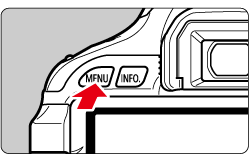
2. Press the <MENU> button to display the menu.
3. Under the [  ] tab, select [Resize] menu option, and then press the <SET> button. Images will be displayed.
] tab, select [Resize] menu option, and then press the <SET> button. Images will be displayed.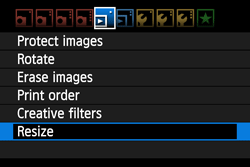
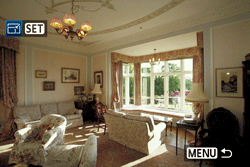
4. Press the <Cross Keys> to select the image you want to resize.
By pressing the <  > button, you can switch to the index display and select an image.
> button, you can switch to the index display and select an image.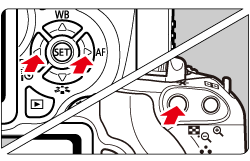
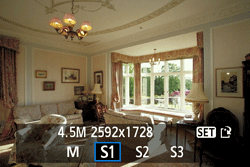
5. Press the <SET> button to display the image sizes. Press the <Cross Keys> to select the desired image size, then press the <SET> button.
NOTE
The target sizes ( M / S1 / S2 / S3 ) in this window will be smaller than the original size. For example, if the original image size is S1, you can select S2 or S3.
6. Select [OK] to save the image, and then press the <SET> button.
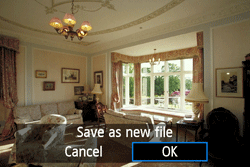
7. Note the destination folder and image file number, then select [OK].
To resize another image, press the <MENU> button to return to the image selection screen, and then repeat steps 4 to 7.
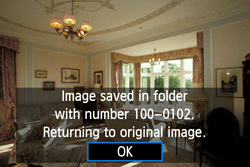
8. To exit and return to the menu, press the <MENU> button.
The [4.5M 2592x1728] image size displayed in step 5 has a 3:2 aspect ratio. The image size according to aspect ratios is shown in the table below. For asterisked image-recording quality, the pixel count does not exactly match the aspect ratio. The image will be slightly cropped.
| Quality | Aspect Ratio and Pixel Count | |||
| 3:2 | 4:3 | 16:9 | 1:1 | |
 | 3456x2304 (8.0 megapixels) | 3072x2304 (7.0 megapixels) | 3456x1944 (6.7 megapixels) | 2304x2304 (5.3 megapixels) |
 | 2592x1728 (4.5 megapixels) | 2304x1728 (4.0 megapixels) | 2592x1456* (3.8 megapixels) | 1728x1728 (3.0 megapixels) |
 | 1920x1280 (2.5 megapixels) | 1696x1280* (2.2 megapixels) | 1920x1080 (2.1 megapixels) | 1280x1280 (1.6 megapixels) |
 | 720x480 (350,000 pixels) | 640x480 (310,000 pixels) | 720x400* (290,000 pixels) | 480x480 (230,000 pixels) |