Specifications

The machine specifications are subject to change without prior notice due to improvements of the machine.

Machine Specifications
Hardware Specifications
TypeDesktop page printer
Printing MethodSemiconductor laser + dry-type electrophotographic method
Toner Fixing SystemOn-demand fixing system
Resolution600 dpi
Print Speed *1
(Plain paper (60 to 90 g/㎡), A4 continuous printing)
1-sided printing: 40 pages per minute
2-sided printing: 40 pages per minute (20 sheets per minute)
Warm-up Time *2
(from power ON until machine enters standby)
Normal start: 29 seconds or less
Quick start: 17 seconds or less
Recovery Time *3
(recovery from sleep mode to standby)
Low (Panel Sleep): 0 second
Mid (Printer Sleep): 10 seconds or less
High (Deep Sleep): 10 seconds or less
First Print Time *3
(1-sided printing on A4 size paper, with the output tray used)
9.3 seconds
Paper CapacityDrawer 1: Approx. 250 sheets
Drawer 2/3/4 (optional): Approx. 550 sheets each
Multi-purpose tray: Approx. 100 sheets
2-Sided PrintingStandard size:
- A3, B4, A4, B5, A5, Ledger (11x17), Legal, Letter, Executive, Foolscap, 8K, and 16K
Custom paper size:
- Width 210.0 to 297.0 mm, Length 148.0 to 431.8 mm
Paper OutputFace down (output tray)/Face up (sub-output tray)
Output Capacity *4Output tray: Approx. 250 sheets
Sub-output tray: Approx. 50 sheets
Noise
(measured in accordance with ISO 7779, declared noise emission in accordance with ISO 9296)
LwAd (Declared A-weighted sound power level (1 B = 10 dB))
- During standby mode: No noise *5
- During printing: 7.30 B or less
LpAm (Declared A-weighted emission sound pressure level (Bystander position))
- During standby mode: No noise *5
- During printing: Approx. 61 dB
Environmental Conditions
(Main unit only)
System requirements
- Temperature: 10 to 30°C
- Humidity: 20 to 80% RH (no condensation)
Power Supply220 to 240 V (±10%), 50/60 Hz (±2 Hz)
Power Consumption *6
(at 20°C)
Maximum: 1,380 W or less
During operation: Approx. 670 W
During standby mode: Approx. 38 W
During sleep mode: Approx. 38 W (<Low (Panel Sleep)>), Approx. 12 W (<Mid (Printer Sleep)>) *7, Approx. 1.1 W (<High (Deep Sleep)>) *7
During power-off: 0.5 W or less (shutdown), 0.8 W or less (quick turn-OFF)
ConsumablesCanon toner cartridge *8
WeightMain unit and accessories
- Main unit (without the toner cartridge): Approx. 25.8 kg
- Toner cartridge: Approx. 2.0 kg
Consumables and optional accessories
- Toner cartridge (standard capacity): Approx. 2.0 kg
- Toner cartridge (high capacity): Approx. 2.3 kg
- Paper feeder PF-A1 (with a drawer): Approx. 8.1 kg
*1 The print speed may be slower depending on the output resolution, paper size, paper type, paper orientation, and a specified number of sheets to print.
*2 May vary depending on the use conditions of the machine (including attached optional accessories and installation environment).
*3 May vary depending on the output environment.
*4 May vary depending on the installation environment and paper type used.
*5 Means that the emission sound pressure level at each bystander position is equivalent to or lower than the ISO7779 absolute standards for background noise.
*6 Even if the printer is turned OFF, power is still consumed slightly while the power plug is inserted in the AC power outlet. To stop the power consumption completely, unplug the power plug from the AC power outlet.
*7 Power may be consumed more than the values shown here according to the situation even if the sleep mode is set to or .
*8 For details on the yield, see the "e-Manual" (HTML manual) in the CD-ROM supplied with the printer.

Controller Specifications
CPU528 MHz + 264 MHz
Memory (RAM) Capacity768 MB
Host InterfaceUSB interface:
- Hi-Speed USB x 3 (Front side x 1, Back side x 2)
Network interface:
- Common to 10BASE-T/100BASE-TX/1000BASE-T (RJ-45) Full Duplex/Half Duplex
User InterfaceLCD:
- 132 x 65 dots
- F-STN LCD
LED indicator:
- 9 indicators
Operation key:
- 12 keys
ROM connector1 connector
SD card slot1 slot

Software Specifications
Built-in Control CommandPCL5e, PCL6, PostScript 3 emulation, UFR II, PDF, and XPS
Built-in Scalable FontPCL: 93 Scalable fonts, 10 Bitmap fonts
PS: 136 standard fonts
Network InterfaceSupported protocol
- TCP/IP (Frame type: Ethernet II)
- AppleTalk
- SMB (option)

Print application
- LPD
- RAW
- IPP/IPPS
- WSD

Paper
Supported Paper Sizes
Paper sizes that can be loaded in the paper drawer, multi-purpose tray, and optional paper feeder are listed below.
: Available : Unavailable
Paper SizeDrawer 1Drawer 2/3/4
(optional)
Multi-Purpose TrayAutomatic 2-Sided Printing *1
A3 *2
(297.0 x 420.0 mm)
B4 *2
(257.0 x 364.0 mm)
A4
(210.0 x 297.0 mm)
B5 *3
(182.0 x 257.0 mm)
A5 *3
(148.0 x 210.0 mm)
*4
Ledger (11 x 17/LDR) *2
(279.4 x 431.8 mm)
Legal (LGL) *2
(215.9 x 355.6 mm)
Letter (LTR)
(215.9 x 279.4 mm)
Executive (EXEC) *3
(184.2 x 266.7 mm)
Statement (STMT) *2
(139.7 x 215.9 mm)
Foolscap (8.5 x 13/FLSC) *2
(215.9 x 330.2 mm)
8K *2
(270.0 x 390.0 mm)
16K *3
(195.0 x 270.0 mm)
Custom size paper *5 *6 *7 *8
Envelope ISO-C5 *2
(162.0 x 229.0 mm)
Envelope No.10 *2
(104.7 x 241.3 mm)
Envelope Monarch *2
(98.4 x 190.5 mm)
Envelope DL *2
(110.0 x 220.0 mm)
Index Card *2 *9
(76.2 x 127.0 mm)
*1 Automatic 2-sided printing is available without replacing paper.
*2 Can be loaded in portrait orientation only.
*3 Can be loaded in landscape orientation only.
*4 Printable only when an optional universal cassette is attached.
*5 The following sizes are available:
・When loaded in portrait orientation:
Width 210.0 to 297.0 mm, Length 210.0 to 431.8 mm
・When loaded in landscape orientation (only with the UFR II printer driver used):
Width 210.0 to 297.0 mm, Length 148.0 to 297.0 mm
*6 The following sizes are available:
Paper drawer included with the optional paper feeder as standard
・When loaded in portrait orientation:
Width 100.0 to 297.0 mm, Length 182.0 to 431.8 mm
・When loaded in landscape orientation (only with the UFR II printer driver used):
Width 148.0 to 297.0 mm, Length 182.0 to 297.0 mm
Universal cassette
・When loaded in portrait orientation:
Width 210.0 to 297.0 mm, Length 210.0 to 431.8 mm
・When loaded in landscape orientation (only with the UFR II printer driver used):
Width 210.0 to 297.0 mm, Length 148.0 to 297.0 mm
*7 The following sizes are available:
・When loaded in portrait orientation:
Width 76.2 to 312.0 mm, Length 127.0 to 470.0 mm
Width 210.0 to 297.0 mm, Length 470.1 to 1200.0 mm (long paper: only with the UFR II printer driver used)
・When loaded in landscape orientation (only with the UFR II printer driver used):
Width 127.0 to 312.0 mm, Length 127.0 to 312.0 mm
*8 The following sizes are available:
・Width 210.0 to 297.0 mm, Length 148.0 to 431.8 mm
*9 Set the paper type to [Envelope].

Paper Types and Paper Source Capacity
Chlorine-free paper can be used with this machine.
: Unavailable
Paper TypeDrawer 1Drawer 2/3/4
(optional)
Multi-Purpose Tray
Plain paper *1 *260 to 74 g/㎡Approx. 250 sheetsApprox. 550 sheetsApprox. 100 sheets
75 to 84 g/㎡Approx. 250 sheetsApprox. 500 sheetsApprox. 100 sheets
85 to 90 g/㎡Approx. 150 sheetsApprox. 500 sheetsApprox. 100 sheets
Heavy paper91 to 120 g/㎡ *2Approx. 100 sheetsApprox. 250 sheetsApprox. 50 sheets
121 to 163 g/㎡Approx. 50 sheets
164 to 199 g/㎡Approx. 30 sheets
Transparency *3Approx. 50 sheets *4
LabelsApprox. 40 sheets
EnvelopeApprox. 10 sheets
*1 Recycled paper is also available.
*2 Automatic 2-sided printing is available without replacing paper.
*3 Use laser printer transparencies. Only A4 and Letter sizes are available.
*4 Print one sheet at a time regardless of the number of loaded sheets when you output printouts to the sub-output tray.

Paper Types and Paper Setting for the Machine
Paper TypePaper Setting in the Printer Driver
Plain paper *160 to 74 g/㎡[Plain L]
[Plain L2] *2
75 to 90 g/㎡[Plain]
[Plain H] *3
Heavy paper91 to 120 g/㎡[Heavy 1]
121 to 163 g/㎡[Heavy 2]
164 to 199 g/㎡[Heavy 3]
Transparency *4[Transparency]
Labels[Labels]
Envelope[Envelope]
[Envelope H] *5
*1 Recycled paper is also available.
*2 When using paper of 60 g/㎡ with [Plain L] specified, it may be output curled or wrinkled, or it may be jammed. In this case, select [Plain L2].
*3 When using paper of 85 to 90 g/㎡ with [Plain] specified, select this paper type if toner is not fully fixed and the printouts are faded.
*4 Use transparencies intended for laser printers. Only A4 and Letter sizes are available.
*5 Select this paper type if toner is not fully fixed and the printouts are faded when the paper type is set to [Envelope].

Printable Area
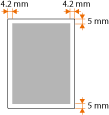
The printable area is shaded. A margin of 10 mm or less around the edge of envelopes is not printable.
・UFR II/PS Printer Driver
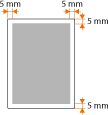

・PCL5e/PCL6 Printer Driver